
Table of Contents
This post contains affiliate links. If you buy through them, we may earn a small commission at no extra cost to you.
Apple WWDC 2026: The Biggest Takeaways From Apple’s Latest OS Glow-Up
Apple WWDC 2026 made one thing very clear: Apple is not just updating its software — it is reshaping the way people interact with their devices. Across iPhone, iPad, Mac, Apple Watch, and Apple Vision Pro, the company is leaning hard into smarter experiences, smoother workflows, and more personal assistance. The result is a software lineup that feels less like a routine refresh and more like a statement about where Apple wants the future to go.
If the overall message of this year’s event can be summed up in one phrase, it would be this: Apple wants its products to feel more intuitive, more aware, and more useful in everyday life. Instead of treating AI like a side feature, Apple is baking it directly into the core of its operating systems. That approach shapes nearly every announcement from the event, from Siri AI upgrades to better privacy tools and more capable productivity features.


Apple Intelligence Takes Center Stage
The biggest shift at Apple WWDC 2026 is the deeper rollout of Apple Intelligence. Rather than launching AI as a separate layer that feels disconnected from the rest of the system, Apple is building it into the tools people already use every day. That makes the experience feel more natural and less like a tech demo.
At the center of that vision is Siri AI. Apple is presenting Siri as a much more capable assistant that can handle richer conversations, understand broader context, and help users get things done across apps. Instead of forcing people to rely on exact phrases or rigid commands, the new Siri is designed to work more like a real assistant — one that can adapt to how people actually communicate.
A major part of that update is Siri’s ability to understand personal context. That means users can search for information from emails, notes, photos, and other device content without having to remember the exact wording. In practical terms, that makes everyday tasks faster, easier, and far less frustrating.
Apple is also introducing a dedicated Siri app, which brings conversations into one place and lets users continue tasks across devices more smoothly. That gives Siri a more persistent feel, almost like a digital thread that follows you from one Apple product to another.
Siri AI Gets More Action-Oriented
One of the most interesting parts of the WWDC 2026 reveal is that Siri AI is no longer just about answering questions. Apple says it can now take action inside apps like Messages, Music, and Reminders. That means users can do things like edit a message, save a song to a playlist, or complete other in-app tasks with less tapping and less switching between screens.
This is where the upgrade starts to feel genuinely useful. Apple is clearly moving Siri from a voice-command tool into a system-level assistant that can help with real work in the background.
Another key feature is Visual Intelligence, which is expanding beyond iPhone to iPad, Mac, and Apple Vision Pro. With this capability, users can interact with what they see on screen or around them, look up details, and take action based on visual content. On iPhone, the Camera app also gets a Siri mode powered by Visual Intelligence, making it easier to learn about the world in real time.
This is a big deal because it shows Apple is thinking beyond simple prompts and responses. The company wants Siri AI to feel embedded in the experience, not bolted onto it.
Writing and Communication Feel More Personal
Apple WWDC 2026 also puts a strong spotlight on communication. Apple Intelligence is being used to make writing across devices more flexible, more polished, and more natural.
Siri AI can now help draft messages from scratch, offer feedback on writing, and adjust tone so text sounds more like the user. In Messages and Mail, it can even match a person’s punctuation, style, and voice. That makes the writing experience feel more personal while still saving time.
Apple is also improving context-based suggestions in Messages and Mail. These suggestions can help people take quick actions, such as creating a calendar event or finding a photo related to a conversation. For anyone juggling work, family, and a never-ending inbox, that kind of automation could be a serious time-saver.
Another useful addition is Call Context, which can surface relevant details from across apps during a phone call. For example, if someone is on a call with an airline, the device might automatically pull up a confirmation code from Mail. It is a smart, subtle example of how Apple Intelligence is meant to work behind the scenes instead of demanding attention.
iOS 27 and Other Platforms Get Real-World Upgrades
Beyond AI, Apple WWDC 2026 introduces the next wave of operating systems, including iOS 27, iPadOS 27, macOS 27, watchOS 27, and visionOS 27. These updates are not just about flashy features. Apple is also focusing on the little things that make devices feel faster and easier to use.
One of the most noticeable changes is the redesign of Liquid Glass. The updated look improves readability, increases contrast, and adds a slider so users can customize its appearance. It is a nice example of Apple balancing design polish with practical usability.
Performance also gets a meaningful boost. Apple says apps open faster, AirDrop transfers are quicker, and overall responsiveness improves across devices. Those are the kinds of upgrades that may not dominate headlines, but they absolutely matter in daily use.
Messages also gets a smarter send indicator, helping users know what has actually been delivered, especially in low-bandwidth situations. That makes communication more reliable when internet quality is not ideal.

Safari, Passwords, and Shortcuts Become Smarter
Some of the most useful upgrades in Apple WWDC 2026 are happening inside Apple’s built-in apps.
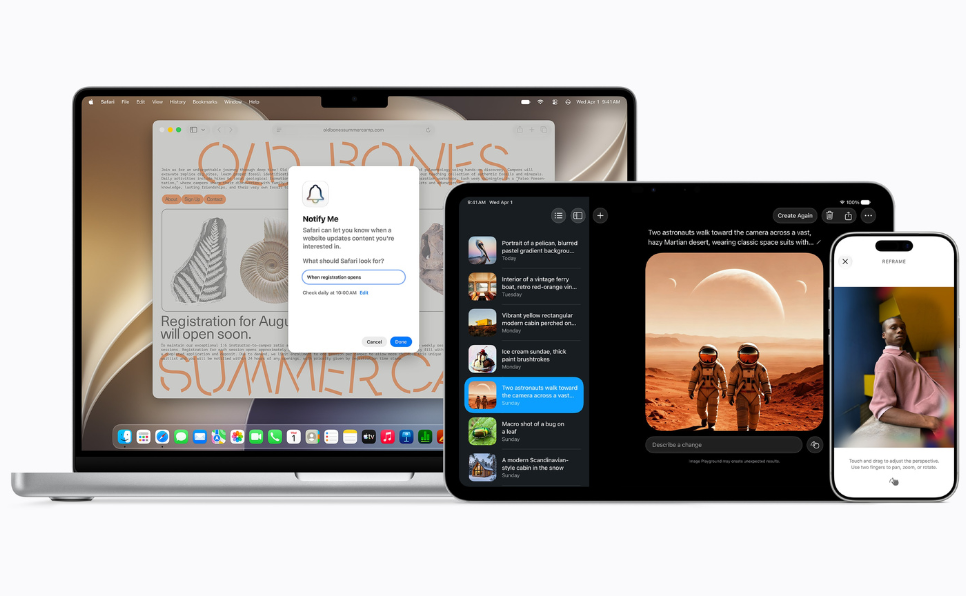
Safari now has automatic tab grouping, which organizes pages by topic so users can keep related content together. Safari Notify Me can also monitor pages for changes like price drops or restocks, then alert users when something important happens. For shoppers, researchers, and deal hunters, that is a pretty handy upgrade.
The Passwords app is getting stronger, too. It can now warn users about weak or compromised passwords and even update them automatically. That is a great example of Apple mixing security with convenience instead of making users choose one or the other.
Shortcuts is also becoming more approachable. Users can simply describe what they want in plain language, and the system will help turn that into an automation. That lowers the barrier for people who have always wanted to use Shortcuts but never had the patience to build workflows from scratch.
Photos, Image Tools, and Visual Creativity Level Up
Apple WWDC 2026 also brings some exciting updates for visual editing and creativity. Apple is expanding its photo tools with features like Spatial Reframing, an Extend tool for enlarging photos, and a more powerful Clean Up tool for removing larger unwanted objects from images.
Apple also introduced new Image Playground upgrades, letting users generate and modify visuals in a wider range of styles, including photorealistic ones. While this may not replace professional design software, it is perfect for quick content creation, social sharing, and casual creative experimentation.
For bloggers, creators, and social media users, these tools could be especially appealing. They make Apple’s ecosystem feel a lot more content-friendly without becoming overly complicated.
Family Safety and Parental Controls Get Stronger
Another major part of the event is Apple’s continued focus on family safety. The new updates show that Apple is trying to pair smarter software with more control for parents.
Parents can now choose which system apps children can access during setup, ranging from just a few essentials to a custom list. Apple is also adding a browsing approval system, which requires children to request permission before visiting new websites.
Communication Safety is expanding as well. Apple says it can help protect children from nudity in Messages and FaceTime, and it now includes intervention for gore and violence in shared images and videos. Parents can also set time limits for categories like Games, Entertainment, and Social Media, along with schedules for when certain apps can be used.
These features show that Apple wants to make safety less complicated and more built into the experience by default.
Apple Watch, Home, and Vision Pro Join the Party
Apple WWDC 2026 is not just about the iPhone or Mac. Apple Watch is getting health-focused improvements, including cycle tracking notifications that may suggest patterns associated with perimenopause. Apple is careful to frame this as a support feature rather than a diagnostic one, which is an important distinction.
The Home app is also getting a smarter layer of Apple Intelligence. It can combine related notifications, describe HomeKit Secure Video footage, and help users search for clips using natural language. Apple also says supported cameras can stream and record in 4K, which is a welcome upgrade for smart home users.
Vision Pro gets some of the most visually ambitious additions. Apple is adding panoramic spatial scenes and real-time preview and editing for 3D models. Those updates continue to push Vision Pro as a platform for immersive media, design, and spatial productivity.
What Apple WWDC 2026 Means for Users
The biggest takeaway from Apple WWDC 2026 is that Apple is moving AI from a feature to a foundation. Apple Intelligence is no longer positioned as an experiment or a bonus. It is being woven into communication, search, productivity, creativity, safety, and entertainment across the ecosystem.
That means Apple devices may soon feel more proactive and context-aware, with less manual effort required from users. Instead of constantly jumping between apps and menus, people may start relying on their devices to find, summarize, organize, edit, and act on their behalf.
At the same time, Apple is staying true to the qualities that have always defined its brand: privacy-first thinking, polished design, family-friendly tools, and tight integration across hardware and software. That combination could help Apple stand out in a crowded AI-driven market.


Final Thoughts
Apple WWDC 2026 makes it clear that the next wave of Apple software is about more than basic updates. With Siri AI, a much bigger Apple Intelligence presence, and practical upgrades across iOS 27 and beyond, Apple is pushing toward a more connected and intelligent user experience.
For Apple fans, bloggers, and tech readers, this is a major shift worth paying attention to. Apple is not just refreshing its software lineup — it is redefining how people interact with their devices every day. If these features roll out as promised, they could shape the future of personal AI across Apple’s ecosystem for years to come.