
Table of Contents
This post contains affiliate links. If you buy through them, we may earn a small commission at no extra cost to you.
Apple Creator Studio Review: Is Apple’s Creative Subscription Finally Worth It?
Apple has always owned a powerful position in the creative world. From filmmakers cutting feature-length projects on Final Cut Pro to musicians producing full albums in Logic Pro, Apple’s creative software has never been casual. These are serious tools built for serious creators.
Now, Apple Creator Studio brings that ecosystem into a more accessible subscription model.
At first glance, Apple Creator Studio may look like a brand-new creative suite. In reality, the apps themselves are not new. What is new is how Apple packages them, adds premium intelligence features, and makes them available through one monthly or annual plan.
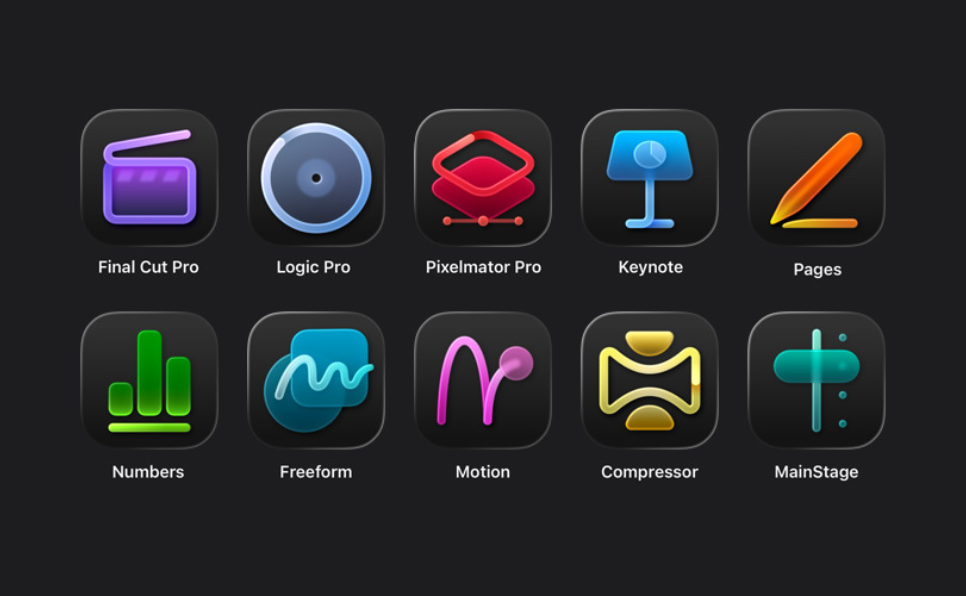
According to Apple’s 2026 announcement, Apple Creator Studio includes premium content and intelligent features for Keynote, Pages, Numbers, and Freeform, plus Final Cut Pro, Motion, Compressor, Logic Pro, MainStage, and PixelMator Pro.
The standard plan costs $12.99 per month or $129 per year, while eligible college students and educators can get it for $2.99 per month or $29.99 per year. Apple also offers a one-month free trial.
That immediately makes this more than just another software bundle. It is Apple’s clearest move yet toward giving creators one connected ecosystem for video, audio, design, productivity, and AI-assisted work.
What Is Apple Creator Studio?
Apple Creator Studio is a collection of Apple creative apps in a subscription-based plan designed for creators, students, educators, business owners, and professionals who want premium tools without buying each pro app separately.
The suite includes 10 major applications:
- Final Cut Pro
- Logic Pro
- PixelMator Pro
- Motion
- Compressor
- MainStage
- Keynote
- Pages
- Numbers
- Freeform
The smartest way to understand Apple Creator Studio is to divide it into four categories:
- Productivity and office creation
- Professional video editing
- Music production and live performance
- Photo editing and visual design
That structure is important because not every user will need every app. A student might use Pages, Keynote, Freeform, and PixelMator Pro. A YouTuber may live inside Final Cut Pro, Motion, Compressor, and PixelMator Pro. A musician may care most about Logic Pro and MainStage.
Apple Creator Studio works because it gives different types of users room to grow.
Apple Creator Studio Pricing: What Does It Cost?
Apple Creator Studio pricing is one of the biggest reasons the bundle deserves attention.
The standard plan is:
- $12.99 per month
- $129 per year
For eligible college students and educators, the education plan is:
- $2.99 per month
- $29.99 per year
Apple also confirms that a one-month free trial is available.
This is a strong value when compared with buying individual professional apps. For example, Final Cut Pro for Mac is still available as a one-time purchase for $299.99, while Logic Pro for Mac is available as a one-time purchase for $199.99.
That means the subscription may appeal to people who want to test multiple Apple creative apps before committing to individual purchases.
Apple also says Pages, Numbers, Keynote, and Freeform remain free for creating, viewing, and editing documents. Apple Creator Studio unlocks premium content and intelligence features for those apps rather than making the basic apps paid.
Who Is Apple Creative Apps For?
Apple Creator Studio isn’t for just one type of user. It is built for a wide creative audience.
It is especially useful for:
- Content creators who make videos for YouTube, TikTok, Instagram, or online courses
- Students who need presentation, writing, editing, and design tools
- Educators who create lessons, media, and classroom resources
- Musicians and producers who need professional audio software
- Small business owners who create marketing content in-house
- Freelancers who want a flexible creative toolkit
- Mac and iPad users who prefer staying inside the Apple ecosystem
The biggest advantage is convenience. Instead of jumping between different companies, subscriptions, file systems, and interfaces, Apple Creator Studio gives users a unified creative workflow across Apple’s own apps.
Productivity Apps: Pages, Numbers, Keynote, and Freeform
The first category in Apple Creator Studio includes Pages, Numbers, Keynote, and Freeform.
These are Apple’s core productivity apps, and many Mac users already recognize them as Apple’s alternative to Microsoft Office.
Pages is Apple’s word-processing app. It is useful for writing reports, essays, proposals, resumes, books, and formatted documents. For bloggers and business owners, Pages can be a clean writing space for drafting content before publishing it online.
Numbers is Apple’s spreadsheet app. You can use it for budgets, tracking content calendars, organizing business data, planning projects, and building simple dashboards.
Keynote is Apple’s presentation app. It is one of the most polished tools in Apple’s productivity lineup and is excellent for pitch decks, class presentations, webinars, and business proposals.
Freeform is Apple’s digital whiteboard. It is ideal for brainstorming, sketching ideas, mapping projects, planning videos, organizing campaigns, or visually connecting concepts.
What makes this category more interesting inside Apple Creator Studio is the addition of premium content and intelligent features. These tools are not only for office work. They help creators plan, present, organize, and communicate ideas more effectively.
For students, entrepreneurs, and professionals, this part of the suite can become the foundation for everyday productivity.

Video Editing Apps: Final Cut Pro, Motion, and Compressor
The second category is where Apple Creator Studio becomes a serious creative platform.
Final Cut Pro, Motion, and Compressor form Apple’s professional video workflow.
Final Cut Pro is Apple’s premium video editing software. It competes directly with tools like Adobe Premiere Pro and DaVinci Resolve. For creators who edit YouTube videos, documentaries, online courses, social media clips, short films, or professional client projects, Final Cut Pro offers a fast and polished editing experience.
Its biggest strength is performance on Apple hardware. Final Cut Pro is deeply optimized for Mac, which makes it especially appealing to creators using Apple silicon devices.
Motion works alongside Final Cut Pro as a motion graphics and animation tool. It is useful for creating titles, visual effects, transitions, animated elements, and 2D or 3D graphics. For creators who want more than basic cuts and captions, Motion adds a professional layer to video production.
Compressor handles advanced export and encoding tasks. It helps package finished videos into different formats, manage codecs, and prepare projects for delivery across platforms.
Together, these three apps create a strong video editing pipeline:
- Edit the project in Final Cut Pro
- Design motion graphics in Motion
- Export and encode with Compressor
For creators who publish consistently, this workflow can save time and improve production quality.
Audio Apps: Logic Pro and MainStage
The third category is built for music creation and live performance.
Logic Pro is Apple’s professional digital audio workstation(DAW). It is designed for recording, editing, mixing, producing, and mastering music. Whether you are building beats, recording vocals, composing film scores, or producing a full album, Logic Pro gives you a complete studio environment.
One of its biggest strengths is the depth of its built-in sounds, loops, instruments, effects, and plugins. For new musicians, that means you can start creating without buying dozens of extras. For experienced producers, it provides a professional-level workspace that can handle complex projects.
MainStage is built for live performance. It allows musicians to bring software instruments, effects, patches, and performance controls to the stage. Instead of working only in a studio setting, MainStage helps performers use Apple’s audio technology in real time.
This makes Logic Pro and MainStage a strong combination:
- Logic Pro is for creating and producing music
- MainStage is for performing that sound live
For singers, producers, church musicians, live bands, keyboard players, and electronic artists, these two apps can become a complete audio ecosystem.
Photo Editing and Design: PixelMator Pro
PixelMator Pro is Apple Creator Studio’s major photo editing and design application.
It is a powerful alternative for users who need image editing, graphics, templates, and visual content creation without relying fully on Adobe Photoshop or Illustrator.
PixelMator Pro can be useful for:
- Editing photos
- Creating blog graphics
- Designing social media visuals
- Building thumbnails
- Creating marketing assets
- Retouching images
- Preparing visuals for presentations
For bloggers, YouTubers, small business owners, and digital marketers, PixelMator Pro may be one of the most practical apps in the bundle. Not everyone needs advanced music production or film-level video editing, but almost every creator needs strong visuals.
PixelMator Pro fills that gap.
The Role of AI in Apple Creative Apps
One of the most important reasons Apple Creator Studio feels relevant in 2026 is the rise of AI-assisted creative work.
Apple’s announcement highlights premium intelligence features across the suite, especially within its creative and productivity tools.
This matters because modern creators no longer only edit videos or write documents. They manage content calendars, repurpose ideas, design visuals, prepare presentations, improve workflows, and produce more content across more platforms.
AI features can help reduce friction in that process.
For beginners, AI can make professional apps feel easier to approach. For experienced creators, it can help speed up repetitive tasks and improve workflow efficiency.
The real value is not that AI replaces creativity. It helps users move faster from idea to execution.


Is Apple Creator Studio Worth It?
Apple Creator Studio is worth considering if you use multiple Apple creative apps or want to explore professional tools without paying high one-time costs upfront.
The strongest value is for users who want access to several premium apps at once. If you only need one app forever, a one-time purchase may still make sense. But if you want Final Cut Pro, Logic Pro, PixelMator Pro, Motion, Compressor, MainStage, and premium productivity features together, the subscription becomes much more compelling.
It is especially valuable for students and educators because the education pricing is extremely affordable compared with the standard plan. At $2.99 per month or $29.99 per year, the student and educator plan makes professional creative tools far more accessible.
Final Thoughts
Apple Creator Studio is not just a bundle of apps. Apple attempts to bring video editing, music production, design, productivity, and AI-assisted creativity into one subscription.
The apps have been around for years, and many of them already have strong reputations. What changes in 2026 is accessibility. Users can now explore the ecosystem through a subscription instead of buying every pro app individually.
For creators, students, teachers, entrepreneurs, and professionals, that is a major advantage.
If you are buying a new Apple device, building a creative workflow, or looking for a polished alternative to multiple creative subscriptions, Apple Creator Studio deserves serious attention.
The best move is simple: start with the free trial, test the apps that match your workflow, and decide whether the monthly or annual plan gives you enough value.
For many Apple users, this may be the most practical creative subscription Apple has ever offered.